EXPANDED IMPORT AND EXPORT FOR ALIBRE DESIGN v28 OR NEWER
Mesh file support – Import & Export
CompuPortAD adds import and export functionality to the “Part” workspace in Alibre Design v28 (or newer) for mesh file formats commonly used in 3D printing and reverse-engineering…
Why CompuPortAD?
CompuPortAD is an Alibre Design addon for the “Part” workspace that extends the import and export functionality, adding support for otherwise unsupported mesh formats. These formats are commonly used in 3D printing and reverse-engineering. CompuPortAD aims to be as close to a ‘single-click’ import pipeline as is possible.

How it works…
CompuPortAD leverages the well established CompuPort mesh processing pipeline to ‘port’ your mesh as accurately as possible.
CompuPortAD preserves your original mesh by avoiding global remeshing and approximation. When simplification is enabled, remeshing is applied locally and selectively, affecting only relevant areas of the model.
CompuPortAD uses advanced deduplication code BEFORE simplification is applied. CompuPortAD uses advanced mesh stitching code to ensure your mesh is as watertight as possible.
Simplification doesn’t always work reliably as just because a mesh is watertight, that doesn’t mean that its perfectly watertight (i.e no vestigal internal facets or overlapped connectivity, both are very common in free-form created models).
Often meshes made in free-form design software (NURBS-based) results in meshes that aren’t perfectly watertight. CompuPortAD has a built-in import warning (enabled by default, can be disabled or re-enabled in CompuPortAD’s options) to show you what to look for to determine if you need to disable CompuPortAD’s in-built mesh simplification functions in CompuPortAD’s options.
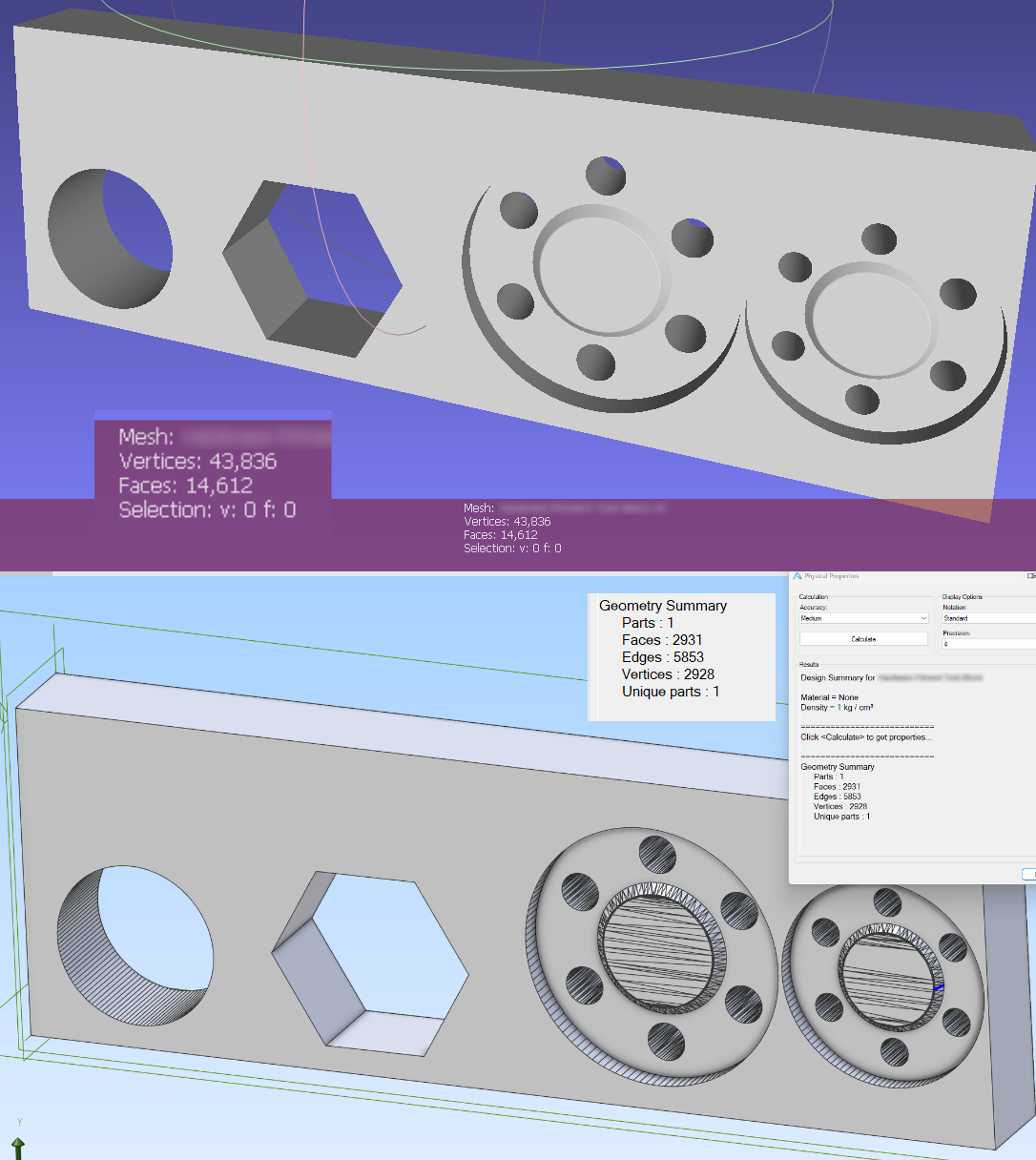
Large models easily handled…
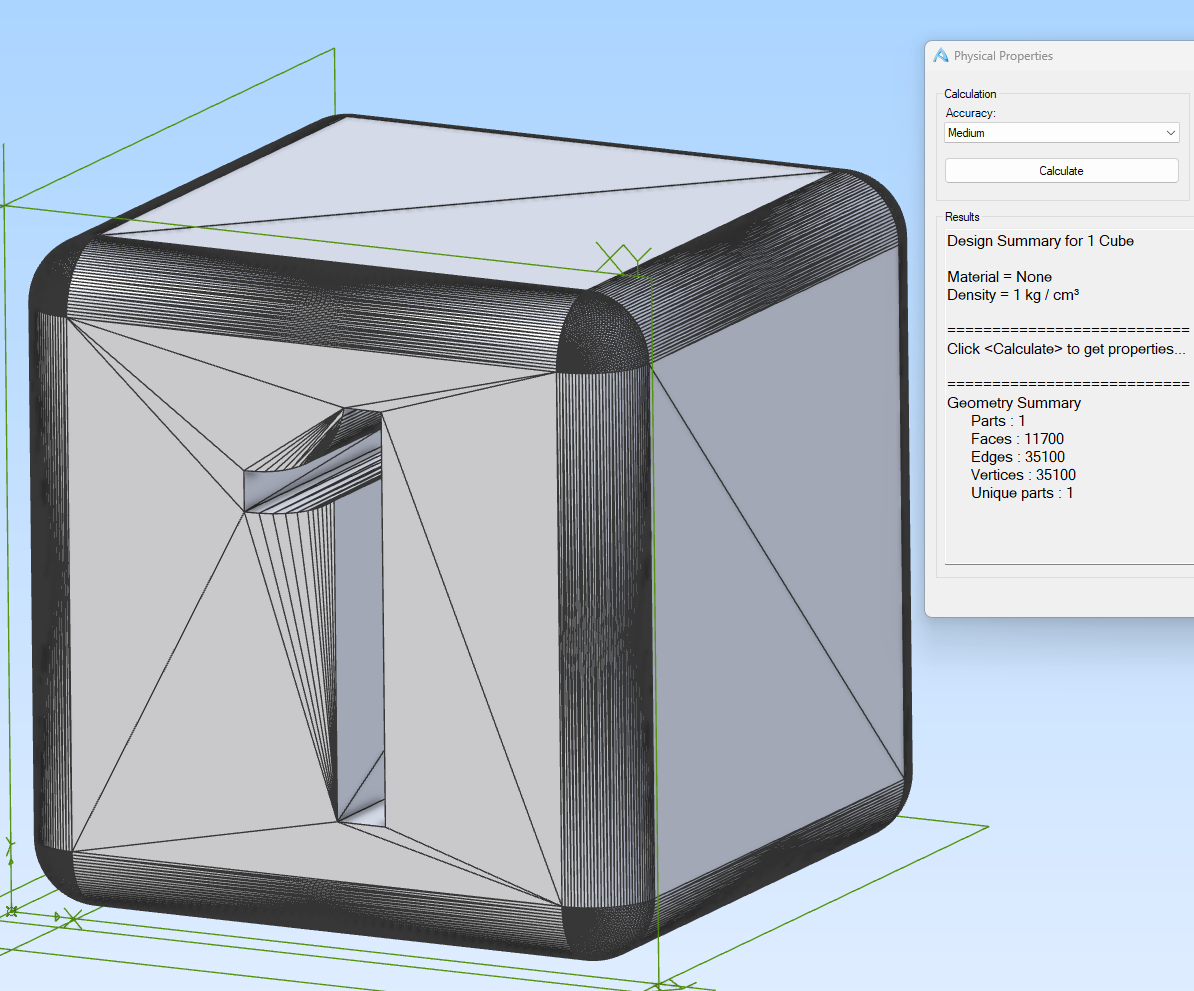
Large models simplified with Simplification & Advanced Simplification…
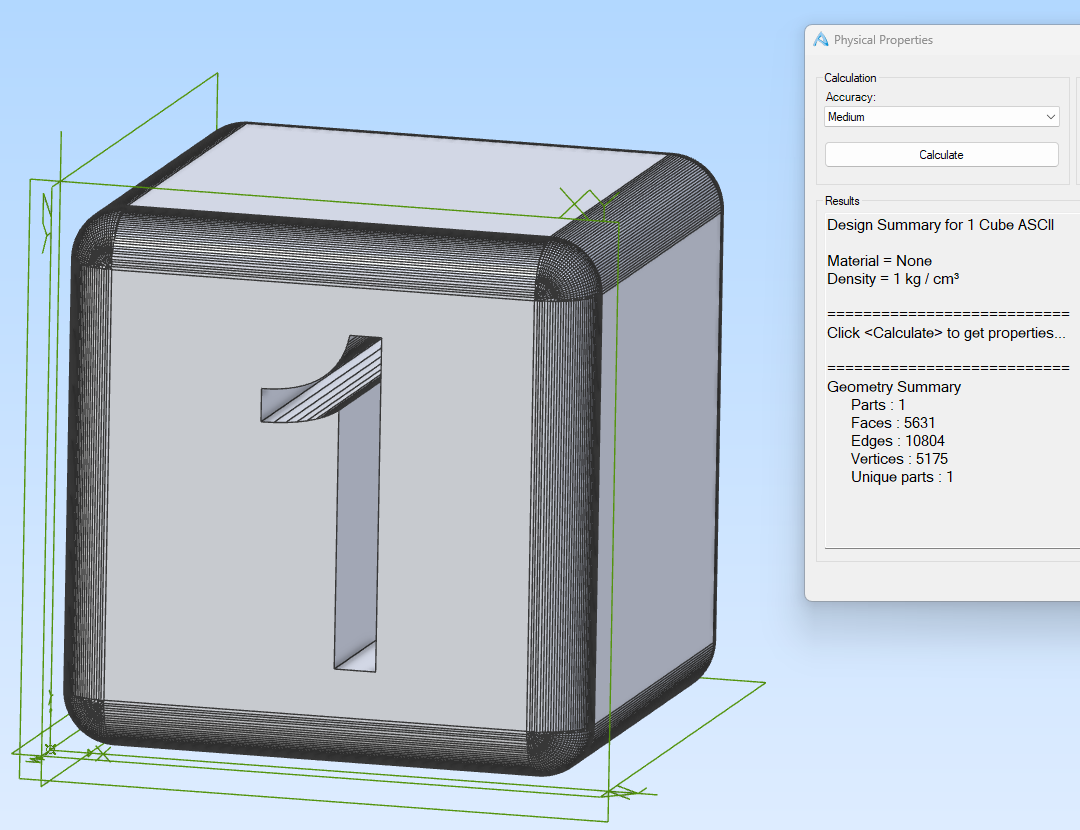
Large models simplified with Simplification, Advanced Simplification & Multi-Pass Simplification…
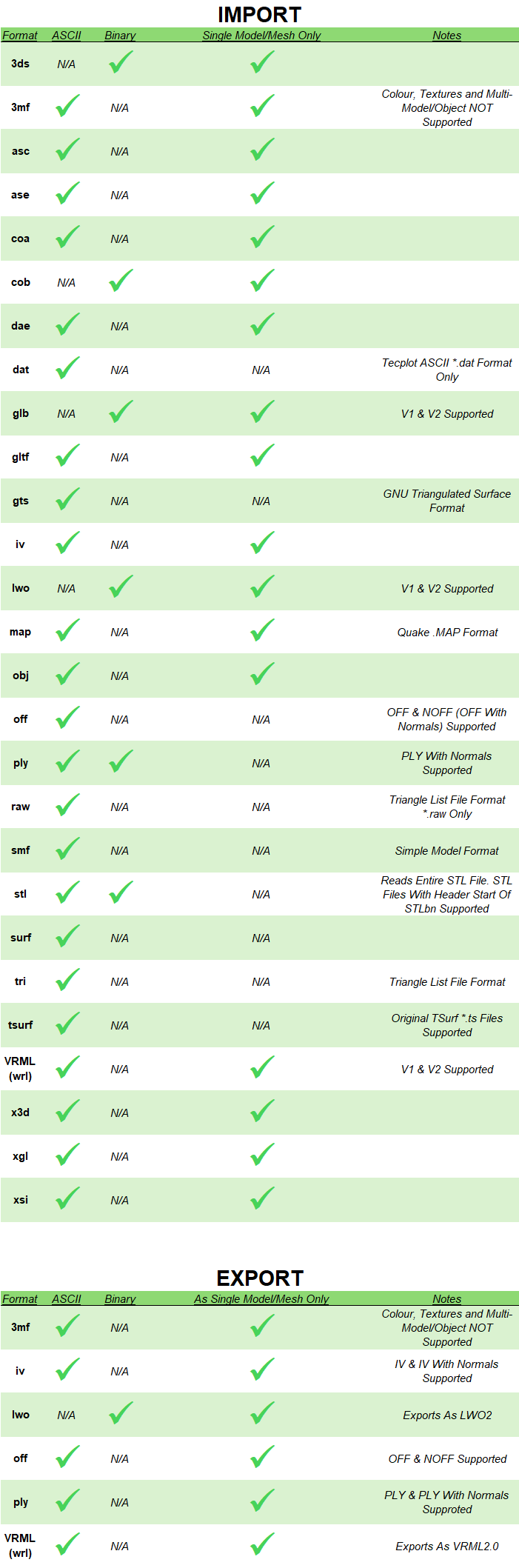
Supported file formats
Try CompuPortAD free for 15 days!
Not sure if CompuPortAD is right for you? Try it free for 15 days without restrictions! CompuPortAD is a 64-bit .NetFramework 4.8 Add-On for Alibre Design
DOWNLOADSHA256 Checksum: 7ee2a2531303aca010dd7be6e4ac2cf6451ddfe3ef781353f8212dc8214dcac4
By default Windows will ‘block’ the installer due to being unsigned, if a blue screen appears, click ‘More Info’ and select ‘Run Anyway’. Alternatively, right-click on the file, select ‘Properties’ and then select ‘Unblock’, click ‘OK’ and then run the installer.
Intended workflow
The intended workflow for using CompuPortAD has two variants:
1. Re-Model (either in the same or a new part window)
2. Surface method. Create surfaces from solid, stitch surfaces to solid (doesn’t work on some models due to source file mesh integrity issues that aren’t 100% fixable)
INTENDED WORKFLOW: 1. Re-Model
Re-Model Workflow
The primary workflow is to re-model the part so we have a native file that can be easily edited.
If you wish to re-model in a new part window, simply do the first three steps below in the same ‘Part’ window as the mesh, then open a new ‘Part’ window, create the planes in that window. Edit each sketch so you can copy and paste each sketch into sketches in the new ‘Part’ window, then perform the remaining steps in that new ‘Part’ window to successfully re-model the part.
1. Use CompuPortAD to import the mesh
From the Alibre Design Home window, create a new ‘Part’. Select the ‘CompuPortAD’ tab (use the Add-On Manager to enabled CompuPortAD if you don’t see it). Use the relevant importer to import your mesh file, CompuPortAD will process the file, close the ‘Part’ window and import the result which will open a new ‘Part’ window displaying the CompuPortAD File Import
3. Create Sketches
Create sketches on the relevant planes and leverage the ‘Project to Sketch’ function to directly obtain precise geometry from the mesh
5. Apply features
Create the features in order using the values you took note of. As you create the features with your sketches and notes, you will create the model
2. Create planes as needed using offsets from the initial planes
Best practice is to use the ‘measurement’ tool to determine the offsets to create planes offset from the initial planes
4. Note all feature dimensions required
Once the sketches are all made, you need to use the ‘measurement’ tool to determine the distances that will be used by features such as ‘extrude’, ‘extrude cut’, ‘hole’, etc. as they can only be applied once you ‘suppress’ the ‘CompuPortAD File Import’ feature
6. Remove: CompuPortAD File Import
Once the part has been fully modelled natively, right-click on the ‘CompuPortAD File Import’ feature and select ‘Delete’. Save your file
INTENDED WORKFLOW: 2. Surface Method
Surface Method Workflow
The secondary workflow is to use Alibre Design’s surface tools to make the part easily editable. This workflow doesn’t work for all parts, only trial and error will work as this method requires perfectly watertight meshes before, during and after import (best results come from exports from CAD software). If this method fails, use Intended Workflow 1.
Intended Workflow: 1. Re-Model1. Use CompuPortAD to import the mesh
From the Alibre Design Home window, create a new ‘Part’. Select the ‘CompuPortAD’ tab (use the Add-On Manager to enabled CompuPortAD if you don’t see it). Use the relevant importer to import your mesh file, CompuPortAD will process the file, close the ‘Part’ window and import the result which will open a new ‘Part’ window displaying the CompuPortAD File Import
3. Stitch to solid
Click ‘Stitch’, ensure the surface is selected, change the stitch option to ‘Stitch to Solid’ and click ‘Ok’. You will now have a single solid body model that can be modified by Alibre Design
2. Create surface from solid
Select the ‘Surface’ tab, and click ‘Convert Solid to Surface’. This will create a surface from the mesh.
Download CompuPortAD!
CompuPortAD is a 64-bit .NetFramework 4.8 Add-On for Alibre Design
DOWNLOADSHA256 Checksum: 69a4dc6da1fd049dfe1044d7d6cb42fd2b12016f409e11b6c8ae0ed0e3812d8a
By default Windows will ‘block’ the installer due to being unsigned, if a blue screen appears, click ‘More Info’ and select ‘Run Anyway’. Alternatively, right-click on the file, select ‘Properties’ and then select ‘Unblock’, click ‘OK’ and then run the installer.
Pricing
Individual Licence
CompuPortAD is licenced per major version when licenced to an Individual. This means if you buy a licence for v1.0.0.0, that licence will activate all versions up to and including v1.9.9.9. This licence does NOT expire!
Company & Educational Institution Licences
CompuPortAD is licenced annually AND per major version when licenced to a Company or an Educational Institution. These licensing terms do not apply to Individual licences.
Availability
CompuPortAD is currently only available through our Authorized Distributer MicroDerm. The buy button below will take you to their product page. Licences purchased will however be delivered to you via email from Compupal®.
* CompuPortAD Individual licences are $385 AUD if buyer is in Australia due to 10% GST. If you live outside Australia, CompuPortAD will be $350 AUD
Educational Institution
$ 2500 / yr.
Most popular
- Licenced to educational institution
- Non-commercial use only
- Version locked (1.*.*.*)
- 100% offline licence
- Install On Every Computer The Institution Owns
Individual
$ 350 aud*
Most popular for Individuals and Small Home Businesses
- Licenced to individual user
- ** Commercial use permitted **
- Version locked (i.e. 1.*.*.*)
- Licence does NOT expire!
- 100% offline licence
- Install On Every Computer You Personally Use
Company
$ 5000 / yr.
Most popular
- Licenced to company
- ** Commercial use permitted **
- Version locked (i.e. 1.*.*.*)
- 100% offline licence
- Install On Every Computer The Company Owns